
 WhatsApp ChannelJoin Now
If you applied for Military Engineer Services (MES) Jobs 2026, downloading your MES Roll No Slip by CNIC is the single most important step before test day — without it, you will not be allowed inside the examination hall. This guide walks you through the exact download process on the official MES portal, explains what your slip will show, and covers what to do if your slip doesn’t appear right away.
MES Roll No Slip 2026 — Quick Overview
| Detail | Information |
|---|---|
| Organization | Military Engineer Services (MES), Pakistan Army |
| Document | Roll No Slip / Admit Card 2026 |
| Applicable Tests | Written Test, Physical Test, Driving Test (post-dependent) |
| Retrieval Method | CNIC + Date of Birth + Verification Code |
| Official Job Portal | jobs.mes.gov.pk |
| Official Main Site | mes.gov.pk |
| Applicable Posts | BPS-04 to BPS-11 (LDC, Civil/MT Driver, Mali, Chowkidar, Sanitary Worker, and more) |
What Is Military Engineer Services (MES)?
MES is one of the oldest and largest infrastructure organizations under the Pakistan Army, responsible for constructing and maintaining military installations, buildings, roads, and airfields across the country. Its recruitment drives combine both civilian and uniformed staff positions, ranging from lower support-staff grades up to technical and engineering roles, which is why MES hiring cycles typically involve several different types of assessments depending on the post applied for.
Why the Roll No Slip Matters
Your roll number slip works as your official entry pass to the test. It confirms that your application was accepted and tells you exactly:
- Which test you’re scheduled for (written, physical, or driving)
- Your test date and reporting time
- Your assigned test center/city
- Your roll number, used for identification during the exam
Candidates who show up without a valid, printed slip are typically turned away at the gate, regardless of how well prepared they are — so this isn’t a step to leave for the last minute.
Allied Bank Teller Batch-II-2026 – Apply Online
Types of MES Tests
Depending on the post you applied for, you may be called for one or more of the following:
| Test Type | Applies To |
|---|---|
| Written Test | Clerical and technical posts (e.g., LDC, technical trades) |
| Physical Test | Posts requiring physical fitness (e.g., Chowkidar, general support staff) |
| Driving Test | Driver-related posts (e.g., Civil/MT Driver) |
Some posts may require candidates to clear more than one stage — for example, a driving-related post may involve both a written screening and a practical driving assessment.
How to Download MES Roll No Slip 2026 by CNIC
Follow these steps carefully on the official portal:
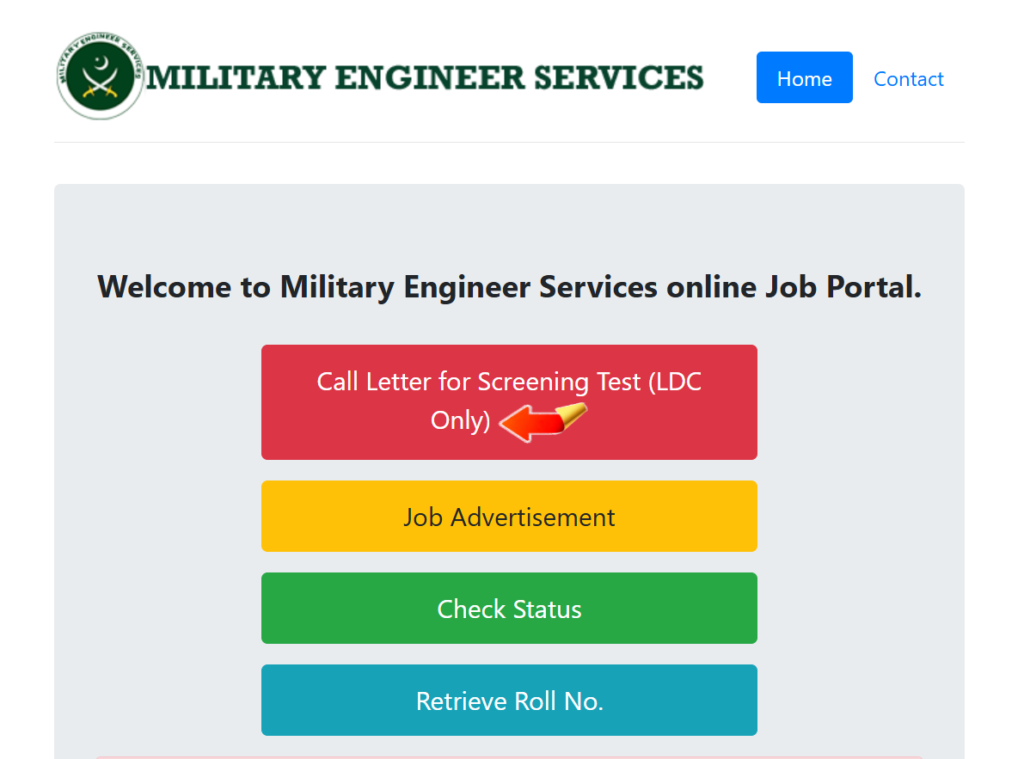
- Visit the official MES recruitment portal at jobs.mes.gov.pk — avoid third-party links claiming to offer “direct downloads.”
- Look for the “Retrieve Roll No” or “Check Status” option on the homepage.
- Enter your CNIC number without dashes, exactly as registered during your application.
- Enter your Date of Birth as it appears on your CNIC.
- Type the verification code (CAPTCHA) shown on the screen.
- Click Submit — your slip will load with your test date, time, venue, and roll number.
- Download the slip as a PDF and print at least one clear copy.
Tip: Use an updated browser such as Google Chrome or Firefox for the smoothest experience, since older browsers sometimes fail to load government portals correctly.
Alternative Ways to Find Your Slip
If the CNIC method doesn’t return a result immediately, most MES recruitment cycles also allow retrieval by:
- Roll Number (if you noted it down during application submission)
- Full Name, matched with your CNIC or application reference
Try both options before assuming there’s an issue with your application.
MES Posts Currently Covered (BPS-04 to BPS-11)
Based on the latest recruitment cycle, roll number slips have been issued for candidates who applied against posts including:
- Lower Division Clerk (LDC)
- Civil / MT Driver
- Mali
- Chowkidar
- Sanitary Worker
- General Worker
MES recruitment also periodically covers technical trade posts such as Electrician, Lineman, Oil Engine Driver, Gas Fitter/Plumber, Mason, and Carpenter in separate advertisement cycles — if you applied under one of these, check your slip individually, as test types and centers can vary by trade.
PERA Force Jobs 2026 Online Apply
What If Your Slip Doesn’t Appear?
Before assuming something has gone wrong, check the following:
- Double-check your CNIC entry — even one incorrect digit will return no results.
- Confirm your date of birth matches exactly what you submitted in your original application.
- Check the timing — MES typically uploads slips only a few days before the scheduled test, so an early check may simply be too soon.
- Clear your browser cache or try a different browser/device if the page fails to load.
- If none of this works, contact the MES recruitment help desk listed on jobs.mes.gov.pk for your specific advertisement.
What to Bring on Test Day
- Printed copy of your MES Roll No Slip
- Original CNIC (mandatory — no exceptions)
- Passport-size photograph, if specified on your slip
- Blue or black pen
Not allowed inside the test center: mobile phones, smart watches, calculators, and other electronic devices. Candidates are generally advised to reach the venue at least 30 minutes before the reporting time stated on their slip.
Important Notes
- Your exact test date and city are confirmed only on your individual roll number slip — always rely on the slip itself rather than general online estimates, since test schedules can vary by post and recruitment batch.
- Keep checking jobs.mes.gov.pk directly for authoritative updates on test dates, answer keys, and merit lists, since third-party sites may carry outdated or conflicting information.
- MES does not charge any fee for downloading your roll number slip — if any unofficial source asks for payment to “generate” or “unlock” your slip, do not proceed.
FAQs — MES Roll No Slip 2026
1. How can I download my MES Roll No Slip 2026 by CNIC?
Visit jobs.mes.gov.pk, open the “Retrieve Roll No” section, enter your CNIC, date of birth, and the verification code, then submit to view and download your slip.
2. What if my CNIC shows no result?
Recheck your CNIC digits for typos, confirm your date of birth matches your application, and try again closer to the test date, since slips are usually uploaded only a few days in advance.
3. Can I download the slip using my name instead of CNIC?
Yes, most MES recruitment cycles also allow retrieval by name or roll number if the CNIC method doesn’t work.
4. Is there a fee to download the MES Roll No Slip?
No, downloading your roll number slip from the official MES portal is completely free.
5. What documents should I carry along with my roll number slip?
Bring your original CNIC and a printed copy of the slip; some posts may also require a passport-size photograph.
6. Which posts require a written test versus a physical test?
Clerical and technical posts generally require a written test, while support-staff posts like Chowkidar typically involve a physical test; driver-related posts may include a driving test as well.
7. Where can I find my exact test date and center?
Your test date, time, and center are printed directly on your individual roll number slip after you retrieve it from jobs.mes.gov.pk.
8. Are electronic devices allowed in the test center?
No, mobile phones, smart watches, calculators, and other electronic devices are not permitted inside the examination hall.
9. How early should I arrive on test day?
It’s recommended to reach the test center at least 30 minutes before the reporting time mentioned on your slip.
10. Where can I check the MES merit list after the test?
Merit lists are published on the official MES portal (jobs.mes.gov.pk) after the recruitment process for each post is completed.
Conclusion
Downloading your MES Roll No Slip 2026 by CNIC takes only a few minutes on the official jobs.mes.gov.pk portal, but it’s a step you cannot skip before appearing in your written, physical, or driving test. Keep your CNIC and date of birth ready, retrieve your slip as soon as it’s uploaded, print a clear copy, and double-check your test date, time, and center before heading out. For the most accurate and up-to-date information, always rely on the official MES portal rather than unverified third-party pages.